Developer Tools · Full Stack
Gatehouse
Know what is ready to merge, and why.
- deterministic verdicts
- read-only GitHub access
- MIT
01The problem
“Can this merge?” lives in five different tabs.
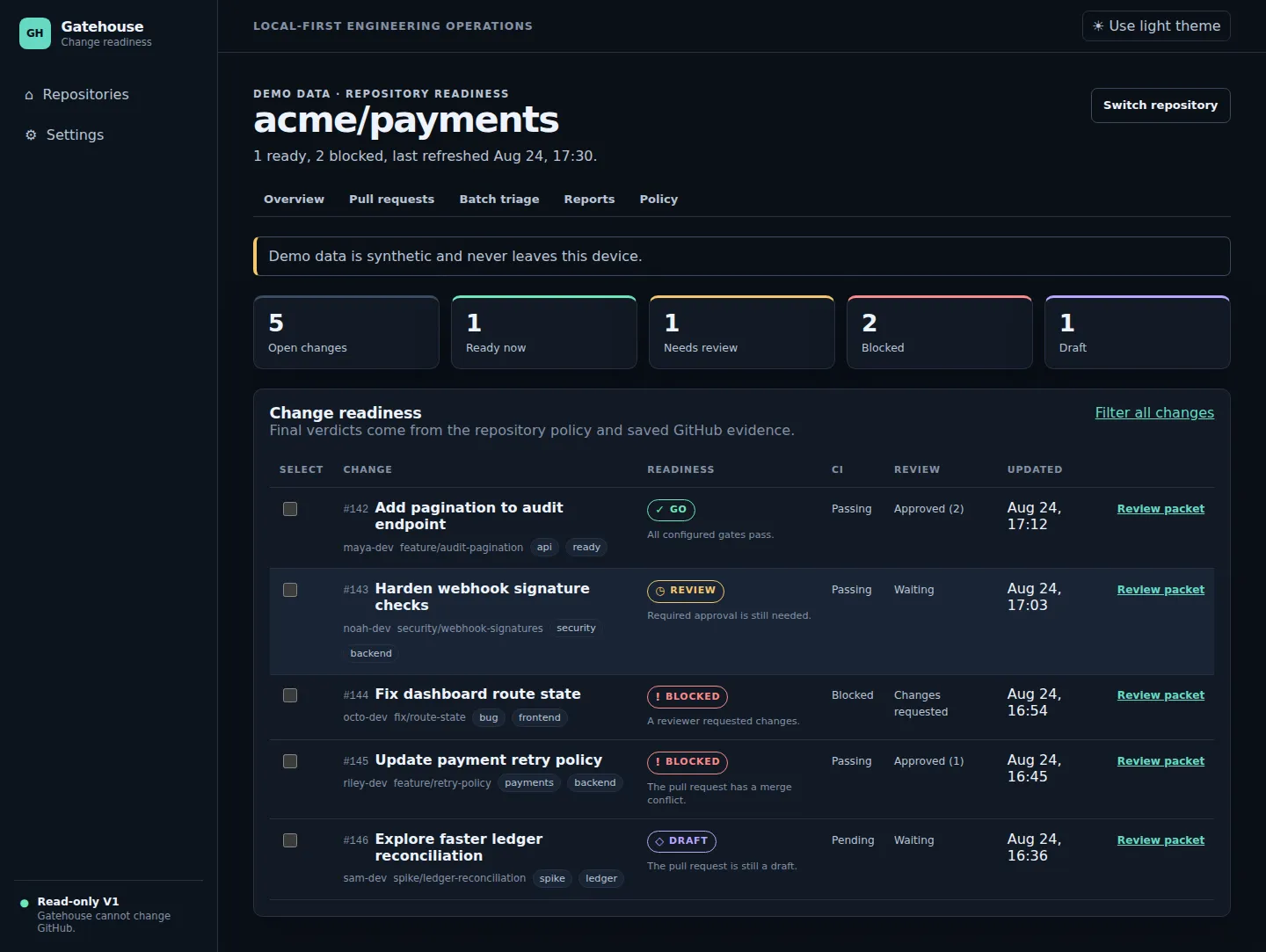
Answering it means checking branch state, CI checks, review approvals, unresolved threads, linked issues, and repository policy — each in its own corner of GitHub. Gatehouse collects those facts locally and reduces them, with documented rules, to a single answer.
The same rules drive the web UI, the CLI, reports, and JSON output — so the dashboard, the terminal, and your scripts can never disagree about what ready means.
02Five verdicts, zero vibes
UNKNOWN is the load-bearing verdict. When the GitHub API cannot supply a fact — a permission is missing, a check has not reported — Gatehouse says so instead of optimistically rounding up. A decision aid that guesses is worse than none.
03Policy as configuration
Policy as configuration
Defaults are safe, and a repository can declare its own rules in a
.gatehouse.yml next to where you run the CLI. Require linked issues or don’t; block
on requested changes or treat them as advisory; demand a current branch or accept a stale one.
Gatehouse stays a decision aid — GitHub branch protection remains the authority, and Gatehouse never merges, comments, pushes, or runs Git. Its GitHub access is read-only, and the local SQLite cache keeps your data on your machine.
readiness:
  require_linked_issue: false
  require_all_checks: true
  require_approval: true
  require_no_unresolved_threads: true
  require_mergeable: true
  require_current_branch: false
  block_on_changes_requested: true
.gatehouse.yml — the whole policy surface
04Engineering decisions
Engineering decisions
- One rules engine, four surfaces
- The readiness model is a single deterministic core consumed by the Blazor dashboard, the CLI, report output, and JSON. Testing the rules once tests every surface.
- Demo mode with synthetic data
-
gatehouse status --demoexercises the full product with synthetic data and makes no GitHub or network request at all — you can evaluate it before trusting it with a token. - Shipped as a dotnet tool
-
Distribution is a NuGet package installed with
dotnet tool install. The release gate installs and runs the packed tool on hosted macOS and Windows, while Linux runs the full build, tests, browser flow, and server smoke test. - Tokens stay out of the repository
- Private repositories need a read-only token supplied by environment variable. The docs are explicit: never put a token in a command, config file, or repository.
05Stack and links
Stack and links
C# · .NET 10 · ASP.NET Core · Blazor · SQLite · xUnit · Playwright browser flow · GitHub
Actions — with the SDK pinned in global.json and restore run in locked mode.
Repository · Architecture · Readiness model · Policy reference